Typecho Blog 环境配置

MariaDB 10 安装

MariaDB repo

1
2
3
4
5
6
7
8
cat /etc/yum.repos.d/MariaDB10.repo
# MariaDB 10.0 CentOS repository list - created 2014-09-28 09:10 UTC
# http://mariadb.org/mariadb/repositories/
[mariadb]
name = MariaDB
baseurl = http://yum.mariadb.org/10.0/centos7-amd64
gpgkey=https://yum.mariadb.org/RPM-GPG-KEY-MariaDB
gpgcheck=1

yum & config

 1
 2
 3
 4
 5
 6
 7
 8
 9
10
11
yum install mysql-server mysql-client
vi /etc/my.cnf.d/server.cnf
[mysqld]
character_set_server=utf8
init_connect='SET NAMES utf8'

mysqladmin -u root password "123456";
mysql -uroot -p123456 -e "create database mulinux;
grant all privileges on mulinux.* to mulinux@localhost identified by '123456';
flush privileges;
quit"

PHP7 安装

下载并安装依赖

1
2
3
4
5
6
rpm -Uvh https://mirror.webtatic.com/yum/el7/webtatic-release.rpm
yum install php71w
php下载地址https://link.jianshu.com/?t=http://cn2.php.net/downloads.php
wget -O php7.tar.gz url/get/from/last/step
tar -xvf php7.tar.gz
yum install libxml2 libxml2-devel openssl openssl-devel bzip2 bzip2-devel libcurl libcurl-devel libjpeg libjpeg-devel libpng libpng-devel freetype freetype-devel gmp gmp-devel libmcrypt libmcrypt-devel readline readline-devel libxslt libxslt-devel

编译

 1
 2
 3
 4
 5
 6
 7
 8
 9
10
11
12
13
14
15
16
17
18
19
20
21
22
23
24
25
26
27
28
29
30
31
32
33
34
35
36
37
38
39
40
41
42
43
44
45
46
47
48
49
50
51
52
53
54
55
56
57
58
59
60
61
62
63
64
65
66
67
68
69
70
71
cd php-7.1.22
./configure \
--prefix=/usr/local/php \
--with-config-file-path=/etc \
--enable-fpm \
--with-fpm-user=nginx \
--with-fpm-group=nginx \
--enable-inline-optimization \
--disable-debug \
--disable-rpath \
--enable-shared \
--enable-soap \
--with-libxml-dir \
--with-xmlrpc \
--with-openssl \
--with-mcrypt \
--with-mhash \
--with-pcre-regex \
--with-sqlite3 \
--with-zlib \
--enable-bcmath \
--with-iconv \
--with-bz2 \
--enable-calendar \
--with-curl \
--with-cdb \
--enable-dom \
--enable-exif \
--enable-fileinfo \
--enable-filter \
--with-pcre-dir \
--enable-ftp \
--with-gd \
--with-openssl-dir \
--with-jpeg-dir \
--with-png-dir \
--with-zlib-dir \
--with-freetype-dir \
--enable-gd-native-ttf \
--enable-gd-jis-conv \
--with-gettext \
--with-gmp \
--with-mhash \
--enable-json \
--enable-mbstring \
--enable-mbregex \
--enable-mbregex-backtrack \
--with-libmbfl \
--with-onig \
--enable-pdo \
--with-mysqli=mysqlnd \
--with-pdo-mysql=mysqlnd \
--with-zlib-dir \
--with-pdo-sqlite \
--with-readline \
--enable-session \
--enable-shmop \
--enable-simplexml \
--enable-sockets \
--enable-sysvmsg \
--enable-sysvsem \
--enable-sysvshm \
--enable-wddx \
--with-libxml-dir \
--with-xsl \
--enable-zip \
--enable-mysqlnd-compression-support \
--with-pear \
--enable-opcache

make && make install

php env

1
2
3
4
vi /etc/profile
PATH=$PATH:/usr/local/php/bin
export PATH
source /etc/profile

config php-fpm

 1
 2
 3
 4
 5
 6
 7
 8
 9
10
11
12
cp php.ini-production /etc/php.ini
sed -i '/;date.timezone =$/a\date.timezone = "Asia\/Chongqing"' /etc/php.ini
cp /usr/local/php/etc/php-fpm.conf.default /usr/local/php/etc/php-fpm.conf
cp /usr/local/php/etc/php-fpm.d/www.conf.default /usr/local/php/etc/php-fpm.d/www.conf
cp sapi/fpm/init.d.php-fpm /etc/init.d/php-fpm
chmod +x /etc/init.d/php-fpm
/etc/init.d/php-fpm start
php -v
which php

useradd -M -s /sbin/nologin php-fpm
编辑www.conf,将user和group改成php-fpm
phpfpm.conf
 1
 2
 3
 4
 5
 6
 7
 8
 9
10
11
12
13
14
15
[global]
pid = /usr/local/php/var/run/php-fpm.pid
error_log = /usr/local/php/var/log/php-fpm.log
[www]
listen = /tmp/php-fcgi.sock
user = php-fpm
group = php-fpm
listen.mode = 0666
pm = dynamic
pm.max_children = 50
pm.start_servers = 20
pm.min_spare_servers = 5
pm.max_spare_servers = 35
pm.max_requests = 500
rlimit_files = 1024

Nginx

1
2
3
4
5
6
7
8
9
wget http://nginx.org/download/nginx-1.10.0.tar.gz
tar -zxvf nginx-1.10.0.tar.gz
cd nginx-1.10.0/
yum -y install zlib zlib-devel
yum -y install pcre pcre-devel
./configure --with-http_ssl_module
make
make install
/usr/local/nginx/sbin/nginx
nginx.conf
 1
 2
 3
 4
 5
 6
 7
 8
 9
10
11
12
13
14
15
16
17
18
19
20
21
22
23
24
25
26
27
28
29
30
31
32
33
34
35
36
37
38
39
40
41
42
43
44
45
46
47
48
49
50
51
52
53
54
55
56
57
58
59
60
61
62
63
64
user nobody nobody;
worker_processes 2;
error_log /usr/local/nginx/logs/nginx_error.log crit;
pid /usr/local/nginx/logs/nginx.pid;
worker_rlimit_nofile 51200;

events
{
    use epoll;
    worker_connections 6000;
}

http
{
    include mime.types;
    default_type application/octet-stream;
    server_names_hash_bucket_size 3526;
    server_names_hash_max_size 4096;
    log_format combined_realip '$remote_addr $http_x_forwarded_for [$time_local]'
    '$host "$request_uri" $status'
    '"$http_referer" "$http_user_agent"';
    sendfile on;
    tcp_nopush on;
    keepalive_timeout 30;
    client_header_timeout 3m;
    client_body_timeout 3m;
    send_timeout 3m;
    connection_pool_size 256;
    client_header_buffer_size 1k;
    large_client_header_buffers 8 4k;
    request_pool_size 4k;
    output_buffers 4 32k;
    postpone_output 1460;
    client_max_body_size 10m;
    client_body_buffer_size 256k;
    client_body_temp_path /usr/local/nginx/client_body_temp;
    proxy_temp_path /usr/local/nginx/proxy_temp;
    fastcgi_temp_path /usr/local/nginx/fastcgi_temp;
    fastcgi_intercept_errors on;
    tcp_nodelay on;
    gzip on;
    gzip_min_length 1k;
    gzip_buffers 4 8k;
    gzip_comp_level 5;
    gzip_http_version 1.1;
    gzip_types text/plain application/x-javascript text/css text/htm application/xml;

server
{
    listen 80;
    server_name localhost;
    index index.html index.htm index.php;
    root /usr/local/nginx/html;

    location ~ \.php$ {
        include fastcgi_params;
        fastcgi_pass unix:/tmp/php-fcgi.sock;
        fastcgi_index index.php;
        fastcgi_param SCRIPT_FILENAME /usr/local/nginx/html$fastcgi_script_name;
    }

}

}
nginx_init
 1
 2
 3
 4
 5
 6
 7
 8
 9
10
11
12
13
14
15
16
17
18
19
20
21
22
23
24
25
26
27
28
29
30
31
32
33
34
35
36
37
38
39
40
41
42
43
44
45
46
47
48
49
50
51
52
53
54
55
56
57
58
59
60
61
62
63
64
65
66
67
68
69
70
71
#!/bin/bash
# chkconfig: - 30 21
# description: http service.
# Source Function Library
. /etc/init.d/functions
# Nginx Settings

NGINX_SBIN="/usr/local/nginx/sbin/nginx"
NGINX_CONF="/usr/local/nginx/conf/nginx.conf"
NGINX_PID="/usr/local/nginx/logs/nginx.pid"
RETVAL=0
prog="Nginx"

start() {
        echo -n $"Starting $prog: "
        mkdir -p /dev/shm/nginx_temp
        daemon $NGINX_SBIN -c $NGINX_CONF
        RETVAL=$?
        echo
        return $RETVAL
}

stop() {
        echo -n $"Stopping $prog: "
        killproc -p $NGINX_PID $NGINX_SBIN -TERM
        rm -rf /dev/shm/nginx_temp
        RETVAL=$?
        echo
        return $RETVAL
}

reload(){
        echo -n $"Reloading $prog: "
        killproc -p $NGINX_PID $NGINX_SBIN -HUP
        RETVAL=$?
        echo
        return $RETVAL
}

restart(){
        stop
        start
}

configtest(){
    $NGINX_SBIN -c $NGINX_CONF -t
    return 0
}

case "$1" in
  start)
        start
        ;;
  stop)
        stop
        ;;
  reload)
        reload
        ;;
  restart)
        restart
        ;;
  configtest)
        configtest
        ;;
  *)
        echo $"Usage: $0 {start|stop|reload|restart|configtest}"
        RETVAL=1
esac

exit $RETVAL

nginx 配置访问项目目录并支持 PHP 的 pathinfo 模式配置(实践时未使用)

 1
 2
 3
 4
 5
 6
 7
 8
 9
10
11
12
13
14
15
16
17
18
19
20
server {
        listen 80;
        server_name xxx.xxxx.com; # 你的域名
 location / {
     root /var/www/xxx项目目录/;
     index index.php;
 }
        location ~ ^(.+\.php)(.*)$ {
     root /var/www/xxx项目目录/;
     fastcgi_pass 127.0.0.1:9000;
     fastcgi_index index.php;
     fastcgi_split_path_info ^(.+\.php)(.*)$;
     fastcgi_param PATH_INFO $fastcgi_path_info;
     if (!-e $document_root$fastcgi_script_name) {
         return 404;
     }
     fastcgi_param SCRIPT_FILENAME$document_root$fastcgi_script_name;
     include fastcgi_params;
         }
    }

certbot ssl Let’s Encrypt

 1
 2
 3
 4
 5
 6
 7
 8
 9
10
11
12
ln -s /usr/local/nginx/sbin/nginx /usr/bin/nginx
ln -s /usr/local/nginx/conf/ /etc/nginx
yum -y install yum-utils
yum-config-manager --enable rhui-REGION-rhel-server-extras rhui-REGION-rhel-server-optional
yum install python2-certbot-nginx
certbot --nginx

#### 添加更新的计划任务
0 0,12 * * * python -c 'import random; import time; time.sleep(random.random() * 3600)' && certbot renew 

#### 参考
https://github.com/jaywcjlove/handbook/blob/master/CentOS/%E4%BD%BF%E7%94%A8%E5%85%8D%E8%B4%B9SSL%E8%AF%81%E4%B9%A6%E8%AE%A9%E7%BD%91%E7%AB%99%E6%94%AF%E6%8C%81HTTPS%E8%AE%BF%E9%97%AE.md#nginx%E5%BA%94%E7%94%A8%E8%AF%A5%E8%AF%81%E4%B9%A6%E7%9A%84%E4%BE%8B%E5%AD%90

添加typecho 伪静态配置

参考文章:http://docs.typecho.org/servers

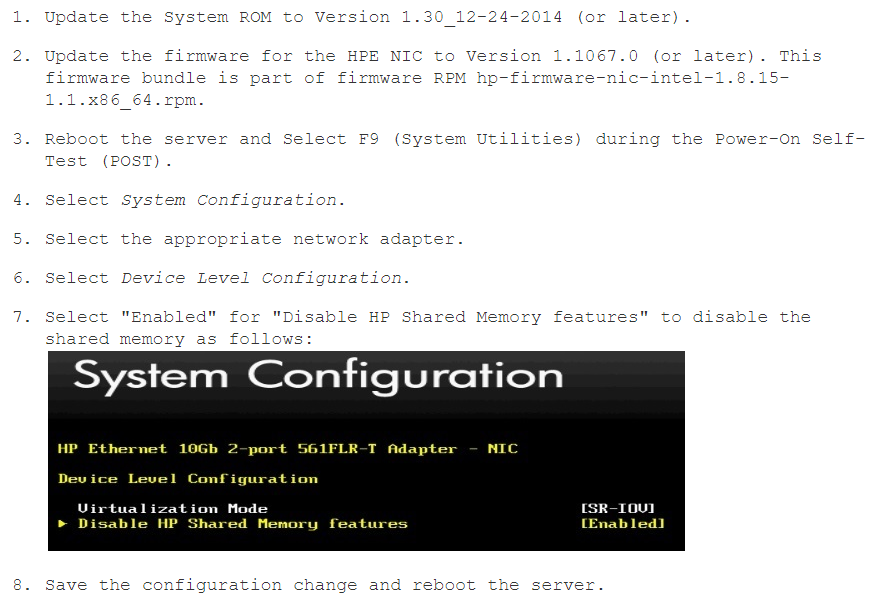
HPGen9做万兆网卡直通时报错

vi /etc/grub2.cnf

1
2
在内核那一行添加”intel_iommu=on“
重启后检查:cat /proc/cmdline | grep iommu

dmesg|grep -e DMAR -e IOMMU

1
报错:vfio-pci 0000:04:00.3: Device is ineligible for IOMMU domain attach due to platform RMRR requirement. Contact your platform vendor.

根据报错在hp论坛查找到该错误信息

1
2
3
4
5
https://support.hpe.com/hpsc/doc/public/display?sp4ts.oid=7271259&docId=emr_na-c04781229&docLocale=en_US

https://community.hpe.com/t5/ProLiant-Servers-ML-DL-SL/Device-is-ineligible-for-IOMMU-domain-attach-due-to-platform/td-p/6751904

通过lspci -vvv | grep Ethernet可以查看到网卡的具体型号

解决方案:

image-20201117124038967

Hadoop2.6集群部署

上传hadoop和jdk安装包并解压

下载地址:

1
2
http://mirror.bit.edu.cn/apache/hadoop/common
http://www.oracle.com/technetwork/java/javase/downloads/

下载并解压

1
2
3
4
5
wget http://archive.apache.org/dist/hadoop/common/hadoop-2.6.0/hadoop-2.6.1.tar.gz
tar zxf jdk-8u172-linux-x64.tar.gz
mv jdk1.8.0_172 /usr/local/
tar zxf hadoop-2.6.0.tar.gz
mv hadoop-2.6.0 /usr/local/

添加环境变量

vi ~/.bashrc

Otrs Api配置&&Curl测试

CMDB字段参考

 1
 2
 3
 4
 5
 6
 7
 8
 9
10
11
12
13
14
15
16
17
18
19
20
21
22
23
24
25
26
27
28
29
30
31
32
33
34
35
36
37
38
39
40
41
42
43
44
45
46
47
48
{
    "ConfigItem": [
        {
            "CurInciState": "Operational", 
            "ConfigItemID": "1", 
            "InciStateType": "operational", 
            "CurInciStateType": "operational", 
            "Number": "4722000001", 
            "CreateBy": "1", 
            "CurDeplState": "Production", 
            "LastVersionID": "5", 
            "DeplState": "Production", 
            "CreateTime": "2018-06-01 02:53:44", 
            "DefinitionID": "1", 
            "VersionID": "5", 
            "DeplStateType": "productive", 
            "CIXMLData": {
                "SerialNumber": "ABC513VEFG", 
                "Ram": "16G", 
                "WarrantyExpirationDate": "2018-05-31", 
                "Vendor": "", 
                "CPU": [
                    "6核", 
                    ""
                ], 
                "Model": "ProLiant DL380 Gen9", 
                "Owner": "", 
                "NIC": {
                    "NIC": "10.0.0.1", 
                    "IPoverDHCP": "No"
                }, 
                "Type": "", 
                "HardDisk": {
                    "HardDisk": "200G", 
                    "Capacity": ""
                }, 
                "GraphicAdapter": "", 
                "FQDN": "", 
                "OperatingSystem": "", 
                "Description": ""
            }, 
            "Class": "Computer", 
            "InciState": "Operational", 
            "CurDeplStateType": "productive", 
            "Name": "yz-o12-10.0.0.1"
        }
    ]
}

工单字段参考

 1
 2
 3
 4
 5
 6
 7
 8
 9
10
11
12
13
14
15
16
17
18
19
20
21
22
23
24
25
26
27
28
29
30
31
32
33
34
35
36
37
38
39
40
41
42
43
{
    "Ticket": [
        {
            "Age": 17572057, 
            "PriorityID": "3", 
            "ServiceID": "", 
            "Type": "Unclassified", 
            "Responsible": "root@localhost", 
            "StateID": "1", 
            "ResponsibleID": "1", 
            "ChangeBy": "1", 
            "EscalationTime": "0", 
            "Changed": "2018-05-31 23:33:25", 
            "OwnerID": "1", 
            "RealTillTimeNotUsed": "0", 
            "GroupID": "2", 
            "Owner": "root@localhost", 
            "CustomerID": "", 
            "TypeID": "1", 
            "Created": "2017-11-09 15:08:10", 
            "Priority": "3 normal", 
            "UntilTime": 0, 
            "EscalationUpdateTime": "0", 
            "Queue": "Raw", 
            "QueueID": "2", 
            "State": "new", 
            "Title": "testtest", 
            "CreateBy": "1", 
            "TicketID": "3", 
            "StateType": "new", 
            "UnlockTimeout": "0", 
            "EscalationResponseTime": "0", 
            "EscalationSolutionTime": "0", 
            "LockID": "1", 
            "ArchiveFlag": "n", 
            "TicketNumber": "2017110947000013", 
            "CreateTimeUnix": "1510211290", 
            "Lock": "unlock", 
            "SLAID": "", 
            "CustomerUserID": "it@mulinux.com"
        }
    ]
}

工单查询json参考

1
2
3
4
5
{
    "Ticket": {
        "Queues": "Postmaster"
    }
}

搜索扩展信息json参考

 1
 2
 3
 4
 5
 6
 7
 8
 9
10
{
  "UserLogin": "root@localhost",
  "Password": "123456",
  "ConfigItem": {
		"Class":"应用",
		"CIXMLData":{
			"CODE":"226"
		}
	} 	
}

操作工单API

获取工单详细信息
1
curl "http://localhost/otrs/nph-genericinterface.pl/Webservice/GenericTicketConnectorREST/Ticket/3?UserLogin=root@localhost&Password=123456"
创建工单
1
curl "http://localhost/otrs/nph-genericinterface.pl/Webservice/GenericTicketConnectorREST/Ticket?UserLogin=root@localhost&Password=123456" -H "Content-Type: application/json" -d "{\"Ticket\":{\"Title\":\"REST Create Test\", \"Type\": \"Unclassified\", \"Queue\":\"Raw\",\"State\":\"open\",\"Priority\":\"3 normal\",\"CustomerUser\":\"customer\"},\"Article\":{\"Subject\":\"Rest Create Test\",\"Body\":\"This is only a test\",\"ContentType\":\"text/plain; charset=utf8\"}}"  -X POST
更新工单
1
curl "http://localhost/otrs/nph-genericinterface.pl/Webservice/GenericTicketConnectorREST/Ticket/3?UserLogin=root@localhost&Password=123456" -H "Content-Type: application/json" -d "{\"Ticket\":{\"Queue\":\"Postmaster\"}}"  -X PATCH
搜索工单
1
curl "http://localhost/otrs/nph-genericinterface.pl/Webservice/GenericTicketConnectorREST/Ticket?UserLogin=root@localhost&Password=123456&Queue=PostMaster"

操作CMDB API

获取CMDB详细信息
1
2
curl "http://localhost/otrs/nph-genericinterface.pl/Webservice/GenericTicketConnectorREST/ConfigItem/1?UserLogin=root@localhost&Password=123456"
curl "http://localhost/otrs/nph-genericinterface.pl/Webservice/GenericTicketConnectorREST/ConfigItem/1" -H "Content-Type: application/json" -d "{\"UserLogin\":\"root@localhost\",\"Password\":\"123456\"}" -X GET
创建CMDB
1
curl "http://localhost/otrs/nph-genericinterface.pl/Webservice/GenericTicketConnectorREST/ConfigItem" -H "Content-Type: application/json" -d "{\"UserLogin\":\"root@localhost\",\"Password\":\"123456\",\"ConfigItem\":{\"Class\":\"Computer\",\"DeplState\":\"Production\",\"InciState\":\"Operational\",\"Name\":\"SH-TG-C4-FB13\",\"CIXMLData\":{\"SerialNumber\":\"6CU513VRKQ\",\"Ram\":\"16G\",\"Model\":\"ProLiant DL380 Gen9\",\"NIC\":{\"NIC\":\"192.168.1.1\",\"IPoverDHCP\":\"No\"}}}}"  -X POST
更新CMDB
1
curl "http://localhost/otrs/nph-genericinterface.pl/Webservice/GenericTicketConnectorREST/ConfigItem/1" -H "Content-Type: application/json" -d "{\"UserLogin\":\"root@localhost\",\"Password\":\"123456\",\"ConfigItem\":{\"Class\":\"Computer\",\"DeplState\":\"Production\",\"InciState\":\"Operational\",\"Name\":\"SH-TG-C4-FB18\"}}"  -X PATCH
搜索CMDB
1
curl "http://localhost/otrs/nph-genericinterface.pl/Webservice/GenericTicketConnectorREST/ConfigItem" -H "Content-Type: application/json" -d "{\"UserLogin\":\"root@localhost\",\"Password\":\"123456\",\"ConfigItem\":{\"Class\":\"Computer\"}}" -X GET

Hexo+Coding Ide+Next6搭建blog

windows安装hexo

 1
 2
 3
 4
 5
 6
 7
 8
 9
10
11
12
13
14
15
16
17
18
19
20
21
22
git config --global core.autocrlf false
ssh -T git@git.coding.net `输入yes`
mkdir hexoblog
cd hexoblog/
npm install hexo -g
hexo -v
hexo init
vi _config.yml
cat /c/Users/80283/.ssh/id_rsa.pub
hexo clean && hexo generate && hexo deployer
hexo server
npm install hexo-server
npm install hexo-deployer-git --save
hexo clean
hexo generate
hexo deploy
vi _config.yml
npm install hexo-deployer-git --save
hexo clean && hexo g && hexo d
hexo clean && hexo g && hexo deploy
vi _config.yml
hexo deploy

添加模板

1
2
3
4
5
6
7
mkdir themes/next
ls themes/next/
git clone https://github.com/iissnan/hexo-theme-next es/next
hexo new page "tags"
hexo new page "categories"
hexo g && hexo d
hexo clean && hexo g && hexo d

多台电脑同步hexo

将本地hexo同步到远程uname hexo分支