Ansible Overview
Benefits of IT Automation
Team Impact
Save time and improve work efficiency
Eliminate repetitive tasks
Less risk of errors
Improve collaboration and job satisfaction
Corporate Impact
Overcome complexity
More innovative resources
Strengthen accountability and compliance
What is Ansible
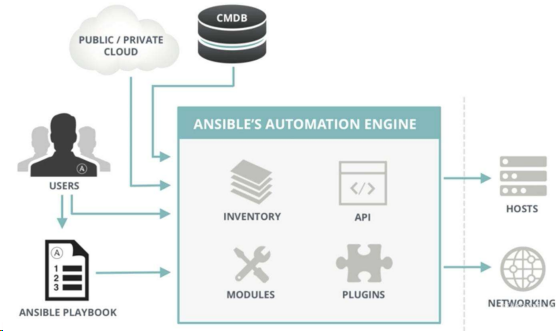
Ansible is an IT automation tool. It can configure systems, deploy software, and coordinate more advanced IT tasks such as continuous deployment, rolling updates. Ansible is suitable for managing enterprise IT infrastructure, from small scale with a few hosts to enterprise environments with thousands of instances. Ansible is also a simple automation language that perfectly describes IT application infrastructure.
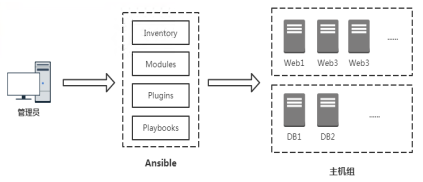
Ansible architecture
Let’s first get to know Ansible
Ansible installation and configuration
Ansible usage requirements
Server requirements
Python2.6/2.7/3.x
*RedHat, Debian, CentOS, OS X, etc. Not supported on Windows
Required by the managed end
OpenSSH
Python2.6/2.7/3.x
Install Ansible
Configuration file
 1
 2
 3
 4
 5
 6
 7
 8
 9
10
# vi /etc/ansible/ansible.cfg
[ defaults ]
inventory = / etc / ansible / hosts
forks = 5
become = root
remote_port = 22
host_key_checking = False
timeout = 10
log_path = / var / log / ansible . log
private_key_file = / root /. ssh / id_rsa
Inventory (Host Inventory)
 1
 2
 3
 4
 5
 6
 7
 8
 9
10
11
12
13
14
15
16
17
18
19
20
21
# 示例1:未分组的主机
green.example.com
blue.example.com
192.168.100.1
192.168.100.10

# 示例2:属于webservers组主机集合
[webservers]
alpha.example.org
beta.example.org
192.168.1.100
192.168.1.110
www[001:006].example.com

示例3:属于dbservers组主机集合
[dbservers]
db01.intranet.mydomain.net
db02.intranet.mydomain.net
10.25.1.56
10.25.1.57
db-[99:101]-node.example.com
Host and host group variables:
1
2
3
4
5
6
7
[ webservers ]
192.168 . 1.10 ansible_ssh_user = root ansible_ssh_pass = '123456’ http_port=80
192.168 . 1.11 ansible_ssh_user = root ansible_ssh_pass = '123456’ http_port=80
[ webservers : vars ]
http_port = 8080
server_name = www . ctnrs . com
Decompose group variables into individual files:
1
2
3
# cat /etc/ansible/group_vars/webservers.yml
http_port : 8080
server_name : www . ctnrs . com
ad-hoc command
命令行工具常用选项
 1
 2
 3
 4
 5
 6
 7
 8
 9
10
11
12
13
14
15
16
17
18
19
20
21
22
23
24
25
26
格式: ansible < host - pattern > [ options ]
选项:
- a MODULE_ARGS , -- args = MODULE_ARGS 模块参数
- C , -- check 运行检查,不执行任何操作
- e EXTRA_VARS , -- extra - vars = EXTRA_VARS 设置附加变量 key = value
- f FORKS , -- forks = FORKS 指定并行进程数量,默认 5
- i INVENTORY , -- inventory = INVENTORY 指定主机清单文件路径
-- list - hosts 输出匹配的主机列表,不执行任何操作
- m MODULE_NAME , -- module - name = MODULE_NAME 执行的模块名,默认 command
-- syntax - check 语法检查 playbook文件 ,不执行任何操作
- t TREE , -- tree = TREE 将日志输出到此目录
- v , -- verbose 详细信息, - vvv更多 , - vvvv debug
-- version 查看程序版本
连接选项:控制谁连接主机和如何连接
- k , -- ask - pass 请求连接密码
-- private - key = PRIVATE_KEY_FILE , -- key - file = PRIVATE_KEY_FILE 私钥文件
- u REMOTE_USER , -- user = REMOTE_USER 连接用户,默认 None
- T TIMEOUT , -- timeout = TIMEOUT 覆盖连接超时时间,默认 10 秒
提权选项:控制在目标主机以什么用户身份运行
- b , -- become 以另一个用户身份操作
-- become - method = BECOME_METHOD 提权方法,默认 sudo
-- become - user = BECOME_USER 提权后的用户身份,默认 root
- K , -- ask - become - pass 提权密码
SSH password authentication
1
2
3
[webservers]
192.168.1.10:22 ansible_ssh_user=root ansible_ssh_pass=’123456’
192.168.1.11:22 ansible_ssh_user=root ansible_ssh_pass=’123456’
SSH key pair authentication
1
2
3
[webservers]
192.168.1.10:22 ansible_ssh_user=root ansible_ssh_key=/root/.ssh/id_rsa
192.168.1.11:22 ansible_ssh_user=root
Ansible common modules
Execute shell commands (command and shell)
File transfer (copy and file)
Management software package (yum)
Users and groups (user)
Deploy from source code management system (git)
Management services (service)
Collect target host information (setup)
Module documentation: https://docs.ansible.com/ansible/latest/user_guide/intro_adhoc.html
##Basic use of Playbook
Benefits of using Playbook
Features
易读的编排语言
Suitable for configuration management and application deployment
Ideal for deploying complex jobs
Playbook documentation: https://docs.ansible.com/ansible/latest/user_guide/playbooks.html
Let’s get to know Playbook first
Automatically deploy Nginx
 1
 2
 3
 4
 5
 6
 7
 8
 9
10
11
12
13
14
15
16
17
18
19
20
21
22
23
24
25
26
27
28
29
30
31
32
# main.yml
---
- hosts : webservers
vars :
hello : Ansible
tasks :
- name : Add repo
yum_repository :
name : nginx
description : nginx repo
baseurl : http : // nginx . org / packages / centos / 7 /$ basearch /
gpgcheck : no
enabled : 1
- name : Install nginx
yum :
name : nginx
state : latest
- name : Copy nginx configuration file
copy :
src : ./ site . conf
dest : / etc / nginx / conf . d / site . conf
- name : Start nginx
service :
name : nginx
state : started
- name : Create wwwroot directory
file :
dest : / var / www / html
state : directory
- name : Create test page index . html
shell : echo "hello {{hello}}" > / var / www / html / index . html
1
2
3
4
5
6
7
8
9
# site.conf
server {
listen 80 ;
server_name www . ctnrs . com ;
location / {
root / var / www / html ;
index index . html ;
}
}
Execute playbook: ansible-playbook main.yaml
YAML语法
Indentation indicates hierarchical relationship
Tab character “tab” indentation is not supported, use spaces for indentation
Usually indent 2 spaces at the beginning
Indent 1 space after the character, such as colon, comma, etc.
“—” indicates YAML format, the beginning of a file
“#” comment
Playbook file structure
 1
 2
 3
 4
 5
 6
 7
 8
 9
10
11
12
13
14
15
16
17
18
---
- name : play1
hosts : webservers
remote_user : root
vars :
var_name : value
tasks :
- name : echo
shell : "echo {{var_name}}"
- name : play2
hosts : webservers
remote_user : root
vars :
var_name : value
tasks :
- name : echo
shell : "echo {{var_name}}"
1
2
3
4
5
6
7
8
---
- hosts : webservers
remote_user : root
vars :
var_name : value
tasks :
- name : echo
shell : "echo {{var_name}}"
notify: triggered when the task ends
handlers: Tasks triggered by specific conditions
 1
 2
 3
 4
 5
 6
 7
 8
 9
10
11
12
13
14
15
---
hosts : webservers
gather_facts : no
tasks :
- name : Copy nginx configuration file
copy :
src : ./ site . conf
dest : / etc / nginx / conf . d / site . conf
notify :
- restart nginx
handlers :
- name : restart nginx
service : name = nginx state = reloaded
 1
 2
 3
 4
 5
 6
 7
 8
 9
10
11
12
13
14
15
16
---
- hosts: webservers
  gather_facts: no

  tasks:
    - name: Install redis
      yum: name=redis state=present
      tags: install

    - name: Copy redis configuration file
      copy: src=redis.conf dest=/etc/redis/redis.conf
      tags: configuration

    - name: Restart redis
      service: name=redis state=restarted
      tags: restart
Specify: ansible-playbook examply.yml –tags “configuration,install”
Skip: ansible-playbook exemply.yml –skip-tags “install”
Playbook file debugging
Syntax check: ansible-playbook main.yml –syntax-check
 1
 2
 3
 4
 5
 6
 7
 8
 9
10
打印语句:
---
- hosts: webservers
  tasks:
    - debug:
      msg: {{group_names}}
    - debug:
      msg: {{inventory_hostname}}
    - debug:
      msg: {{ansible_hostname}}
Case: Automatically deploy Tomcat
 1
 2
 3
 4
 5
 6
 7
 8
 9
10
11
12
13
14
15
16
17
18
19
20
21
22
23
24
25
---
hosts : webservers
gather_facts : no
vars :
tomcat_version : 8.5 . 34
tomcat_install_dir : / usr / local
tasks :
- name : Install jdk1 . 8
yum : name = java - 1.8 . 0 - openjdk state = present
- name : Download tomcat
get_url : url = http : // mirrors . hust . edu . cn / apache / tomcat / tomcat - 8 / v {{ tomcat_version }} / bin /
apache - tomcat - {{ tomcat_version }} . tar . gz dest =/ tmp
- name : Unarchive tomcat - {{ tomcat_version }} . tar . gz
unarchive :
src : / tmp / apache - tomcat - {{ tomcat_version }} . tar . gz
dest : "{{ tomcat_install_dir }}"
copy : no
- name : Start tomcat
shell : cd {{ tomcat_install_dir }} &&
mv apache - tomcat - {{ tomcat_version }} tomcat8 &&
cd tomcat8 / bin && nohup ./ startup . sh &
Playbook definition and use of variables
Command line
Define in Inventory
Define in Playbook
 1
 2
 3
 4
 5
 6
 7
 8
 9
10
# 在Playbook中定义变量
---
hosts : webservers
gather_facts : no
vars :
var_name : value
var_name : value
tasks :
- name : hello
shell : "echo {{var_name}}"
Define in Role
Register variables (register)
 1
 2
 3
 4
 5
 6
 7
 8
 9
10
# 注册变量
---
hosts: webservers
  gather_facts: no
  tasks:
    - name: Get date
      command: date +"%F_%T"
      register: date_output
    - name: Echo date_output
      command: touch /tmp/{{date_output.stdout}}
System information variables (facts)
1
2
3
4
5
6
#  系统变量
---
hosts: webservers
  tasks:
    - name: Get hostname
      debug: msg={{ansible_hostname}}
Playbook file reuse
include & import difference
1
2
3
4
5
6
7
include*(动态):在运行时导入
* --list-tags,--list-tasks不会显示到输出
* 不能使用notify触发来自include*内处理程序名称(handlers)

import*(静态):在Playbook解析时预先导入
* 不能与循环一起使用
* 将变量用于目标文件或角色名称时,不能使用inventory(主机/主机组等)中的变量
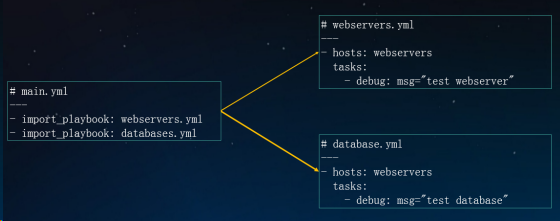
import_playbook
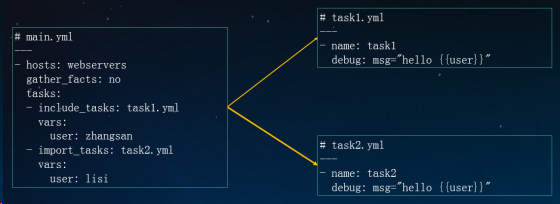
includetasks & importtasks
Playbook process control
condition
1
2
3
4
5
6
- hosts: webservers

  tasks:
    - name: Host 192.168.1.12  run this task
      debug: msg="{{ansible_default_ipv4.address}}"
      when: ansible_default_ipv4.address == '192.168.1.12 '
 1
 2
 3
 4
 5
 6
 7
 8
 9
10
11
12
13
14
15
16
17
18
19
- hosts: webservers

  tasks:
    - name: Update apache version - yum
      yum: name=httpd state=present
      when: ansible_pkg_mgr == 'yum'
      notify: restart httpd

    - name: Update apache version - apt
      apt: name=apache2 state=present update_cache=yes
      when: ansible_pkg_mgr == 'apt'
      notify: restart apache2

  handlers:
    - name: restart httpd
      service: name=httpd state=restared
 handlers:
    - name: restart apache2
      service: name=apache2 state=restared
1
2
3
4
5
tasks:
  - name: "shut down CentOS 6 and Debian 7 systems"
    command: /sbin/shutdown -t now
    when: (ansible_distribution == "CentOS" and ansible_distribution_major_version == "6") or
          (ansible_distribution == "Debian" and ansible_distribution_major_version == "7")
1
2
3
4
5
6
tasks:
  - name: "shut down CentOS 6 systems"
    command: /sbin/shutdown -t now
    when:
      - ansible_distribution == "CentOS"
      - ansible_distribution_major_version == "6"
Loop
 1
 2
 3
 4
 5
 6
 7
 8
 9
10
11
12
13
- name: with_list
  debug:
    msg: "{{ item }}"
  with_list:
    - one
    - two

- name: with_list -> loop
  debug:
    msg: "{{ item }}"
  loop:
    - one
    - two
1
2
3
4
5
6
7
8
9
- name: with_items
  debug:
    msg: "{{ item }}"
  with_items: "{{ items }}"

- name: with_items -> loop
  debug:
    msg: "{{ item }}"
  loop: "{{ items|flatten(levels=1) }}"
Playbook template (jinja2)
Conditions and loops
1
2
3
4
5
6
7
8
# test.yml
---
- hosts : webservers
vars :
hello : Ansible
tasks :
- template : src = f . j2 dest =/ tmp / f . j2
 1
 2
 3
 4
 5
 6
 7
 8
 9
10
11
12
13
14
# f.j2
{% set list=['one', 'two', 'three'] %}

{% for i in list %}
   {% if i == 'two' %}
       -> two
   {% elif loop.index == 3 %}
       -> 3
   {% else %}
       {{i}}
   {% endif %}
{% endfor %}

{{ hello }}
1
2
3
4
{% set dict={'zhangsan': '26', 'lisi': '25'} %}
{% for key, value in dict.iteritems() %}
    {{key}} -> {{value}}
{% endfor %}
Case: Managing Nginx configuration files
 1
 2
 3
 4
 5
 6
 7
 8
 9
10
11
12
13
14
15
16
# main.yml
---
- hosts : webservers
gather_facts : no
vars :
http_port : 80
server_name : www . ctnrs . com
tasks :
- name : Copy nginx configuration file
template : src = site . conf . j2 dest =/ etc / nginx / conf . d / www . ctnrs . com . conf
notify : reload nginx
handlers :
- name : reload nginx
service : name = nginx state = reloaded
 1
 2
 3
 4
 5
 6
 7
 8
 9
10
11
12
13
14
15
# site.conf.j2
{% set list=[10, 12, 13, 25, 31] %}
upstream {{server_name}} {
    {% for i in list %}
       server 192.168.1.{{i}}:80;
    {% endfor %}
}
server {
    listen       {{ http_port }};
    server_name  {{ server_name }};

    location / {
        proxy_pass http://{{server_name}};
    }
}
Roles
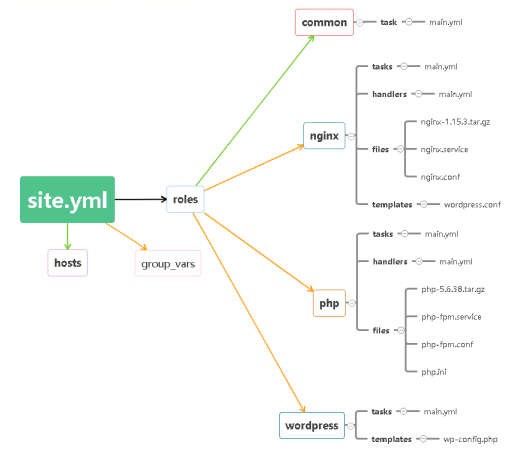
Roles directory structure
 1
 2
 3
 4
 5
 6
 7
 8
 9
10
11
12
13
14
15
16
17
18
site . yml
webservers . yml
fooservers . yml
roles /
common /
tasks /
handlers /
files /
templates /
vars /
defaults /
meta /
webservers /
files /
templates /
tasks /
handlers /
vars /
tasks - Contains a list of the main tasks to be performed by the character
handlers - Contains the handlers used by the role
defaults - role default variables
vars - other variables of the character
files - files used during role deployment
templates - Templates used during role deployment
meta - some metadata for role definition
###Basic use of Roles
1
2
3
4
5
6
---
- hosts: webservers
  roles:
     - common
     - nginx
     - php
 1
 2
 3
 4
 5
 6
 7
 8
 9
10
11
12
---
- hosts : webservers
roles :
- common
- role : nginx
vars :
dir : '/opt/a'
app_port : 5000
- role : php
vars :
dir : '/opt/b'
app_port : 5001
1
2
3
4
5
6
7
8
9
---
- hosts: webservers
  roles:
    - role: common
      tags: ["common"]
    - role: nginx
      tags: ["nginx"]
    - role: php
      tags: ["php"]
Case: Deploy Web Server
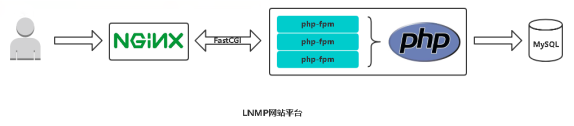
Reference documentation
Best Practices: https://docs.ansible.com/ansible/latest/userguide/playbooksbest_practices.html
Example reference: https://github.com/ansible/ansible-examples